Replacing Excel With a Web Application: A Pragmatic Migration Playbook
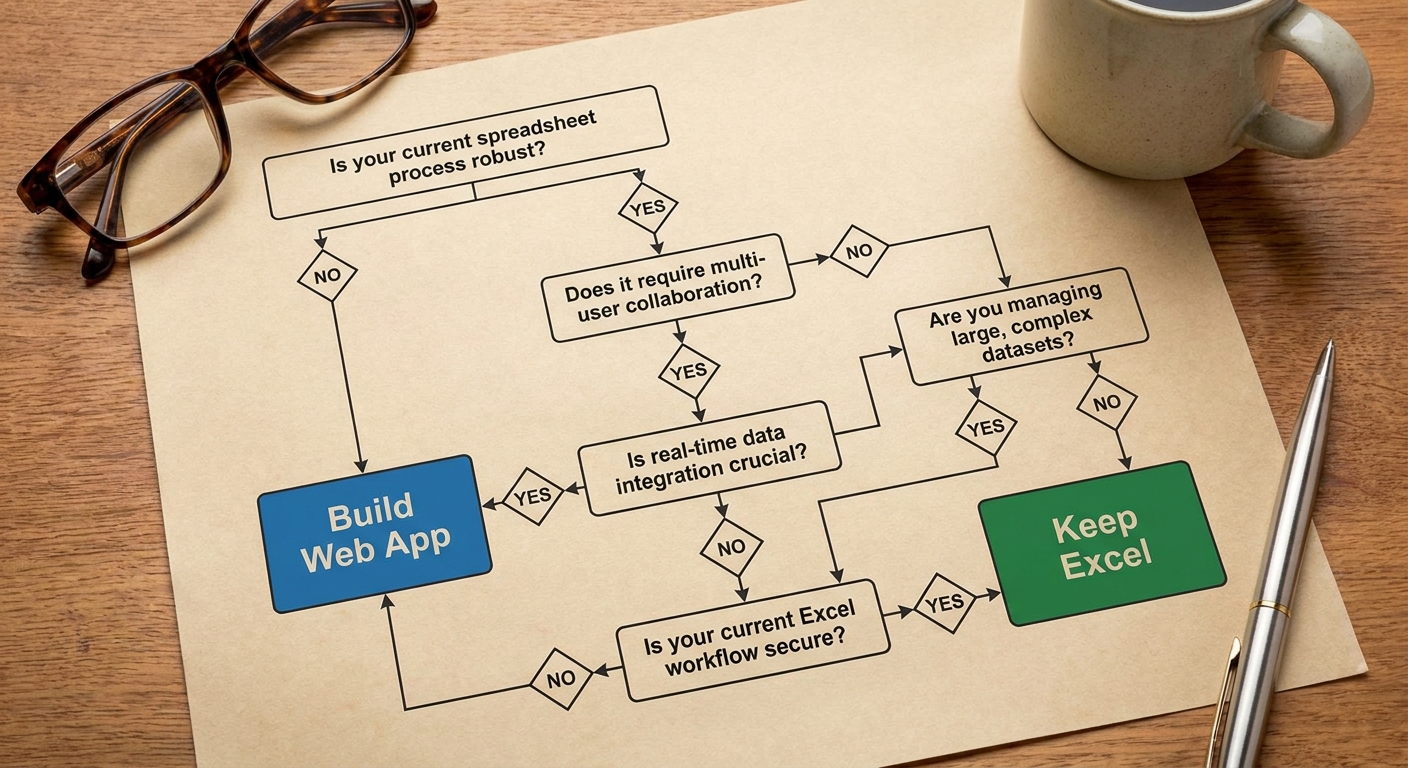
Replace your spreadsheet when you need concurrent users, role-based permissions, an audit trail, or input from hardware like barcode scanners. Keep Excel for ad-hoc modelling and analysis. A custom web application for core operations typically means a working prototype in about six weeks, a full build in 8 to 12 weeks, and a cost in the low tens of thousands rather than millions.
Key takeaways
- Spreadsheets break because they get promoted into databases, workflow engines and permissions systems all at once.
- Do not rebuild the spreadsheet in a browser. Convert freeform rows into structured, validated database records.
- Run old and new side by side during rollout, but name one system as the source of truth at every phase.
- Design for entry speed. Operators abandon any form that is slower than their keyboard muscle memory.
The file is called Schedule_v3_final_FINAL.xlsx. Three people have it open. Only one of those copies will survive the afternoon.
Every operations manager knows that file. The spreadsheet did not fail because someone built it badly. It failed because it became a database, a workflow engine and a permissions system at the same time, and it was never designed to be any of those. Excel is an excellent prototyping tool that got quietly promoted into a multi-user operational system. The failure is architectural, not moral, and nobody needs to feel stupid about it.
The Five Breaking Points
File locking and concurrency. Several people need to read and write at once. A shared network drive locks the file the moment one of them opens it. A manager leaves the workbook open and goes to lunch, and the floor cannot update afternoon batch status. Cloud-synced spreadsheets soften this, but under genuine concurrent load they tend to spawn conflicting copies that someone has to merge by hand.
The single point of failure. Every legacy operational workbook has an author. That person wrote the macros, nested the formulas and holds the fragile logic in their head. When they take leave, the business holds its breath. When they resign, the file becomes a black box nobody dares touch.
Silent formula corruption. Spreadsheets apply no schema validation at the point of entry. A user can type a date, a supplier name or a question mark into a cell meant for currency, and nothing stops them. Audits of operational business spreadsheets have found errors in roughly 94 percent of them (Powell, Baker and Lawson, Decision Support Systems, 2008; Panko, EuSpRIG, 2015). The problem is not carelessness. Once a workbook's complexity exceeds human working memory, even skilled analysts cannot reliably audit it. The Reinhart-Rogoff debt sustainability study, a heavily cited piece of academic economics, was compromised by exactly that kind of Excel error (Herndon, Ash and Pollin, 2013).
No permission granularity. You cannot hide margins from floor operators while still showing them today's batch ticket. You cannot let a client see their own job progress without exposing your internal notes on the row beneath it. A flat file is an all-or-nothing security model.
Manual copy-paste between workbooks. Moving numbers from a production log into an accounting model is where the worst errors hide, and the risk compounds every time someone does it. The JPMorgan Task Force report into the 2012 London Whale episode described manual copying between spreadsheets inside a risk model that went on to cost the bank billions (JPMorgan Task Force Report, 2013). This is not a small-company problem.
When Keeping Excel Is the Right Answer
Not every spreadsheet should become a web application. Excel is still the best tool in the world for certain jobs, and replacing those would be a waste of money.
Keep the spreadsheet if the model is for ad-hoc financial modelling, forecasting or scenario planning. A quarterly pricing model belongs in Excel. An analyst needs to ask what happens if raw material costs rise five percent or freight rates fall, change a variable, and see the answer immediately. That flexibility is the entire point of the tool.
Keep it if the workflow has no fixed schema and the structure changes week to week. When you are still working out what data you need to collect at all, a relational database will feel like a straitjacket.
Keep it if the output does not trigger an operational handoff. One or two analysts producing a report, with no need for concurrent write access, do not need an application. A live dispatch board that the warehouse reads every ten minutes is a different animal entirely.
The Anti-Pattern: Do Not Rebuild Excel in a Browser
Once a company commits to migrating, the most common mistake arrives early. Someone asks the developer to build a web app that looks and behaves exactly like the old spreadsheet.
That request defeats the purpose. Freeform cells are the source of the bad data. Build a browser grid that lets people type whatever they like, and you have paid good money to recreate the original problem with a login screen on top.
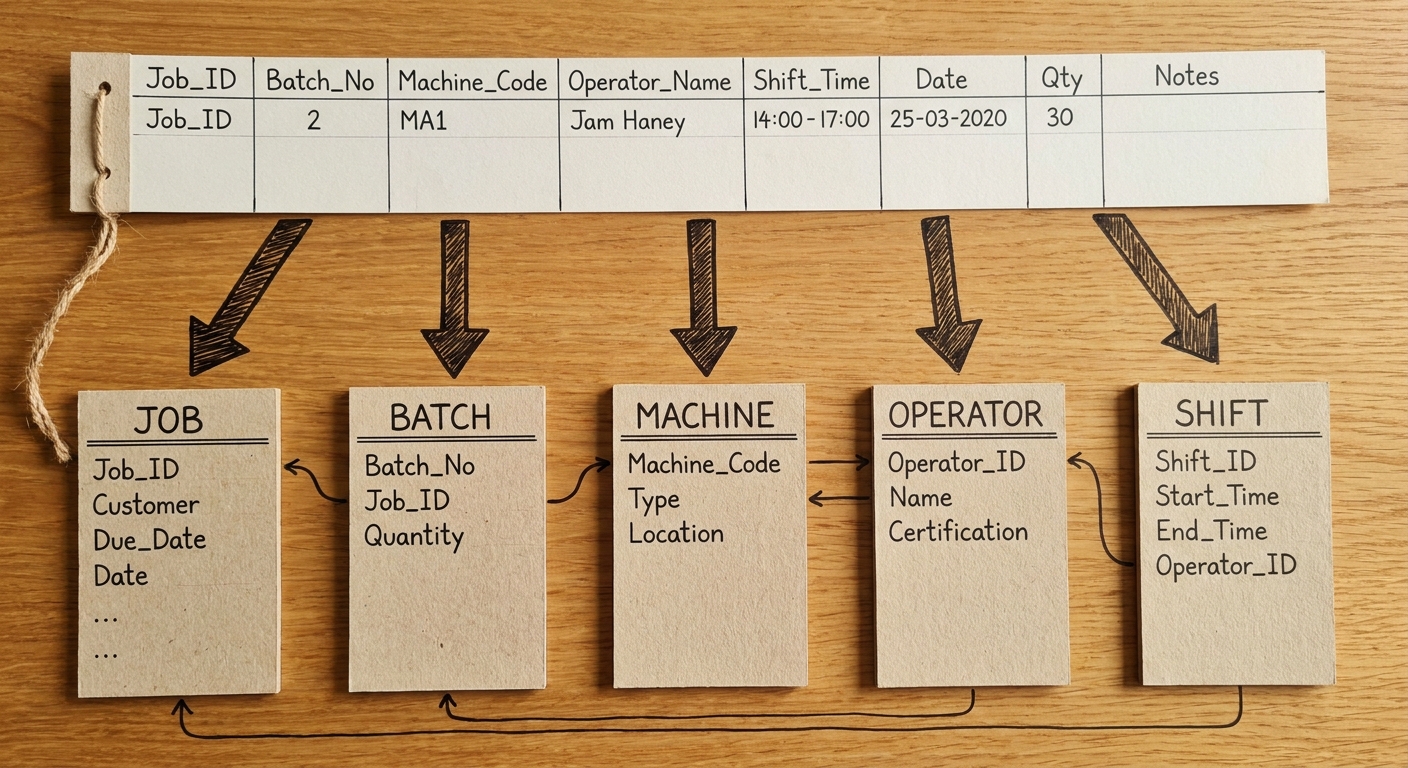
The real work is converting messy rows into structured entities with validation at entry. Take one chaotic production log row. In Excel it holds an operator's name spelled three different ways, a date in an inconsistent format, and a machine number typed from memory. In a web application, that single row becomes separate Job, Batch, Machine, Operator and Shift records, with the database enforcing the relationships between them. Nobody types the operator's name. They pick it from a definitive list, or they scan a badge.
Why constrain input so tightly? Because controlled studies put the average error rate for single-entry keying at roughly one percent (Barchard and Pace, 2011). Drop-downs, barcode scans and pre-filled defaults remove that error at the moment of capture instead of catching it three reports later.
The Five-Phase Migration Framework
You cannot switch off the old file on a Friday and expect the plant to run on Monday. The sequence below is how the transition actually holds together.
Phase 1: Floor audit and rule extraction. Watch the work happen. No slide decks. What management believes happens on the floor is rarely what happens, because operators have built workarounds to survive the broken spreadsheet, and those workarounds are the real process. Then translate opaque formulas into plain business rules: if yield drops below 92 percent, notify the line manager by LINE or WhatsApp.
Phase 2: Database normalisation and cleaning. Legacy workbooks carry inconsistent date formats, misspelled categories and orphaned calculations pointing at deleted tabs. Clean the text strings, decide what to do about missing historical fields, and separate the archive from active operational records. Import dirty data straight into a relational database and the new system breaks on day one.
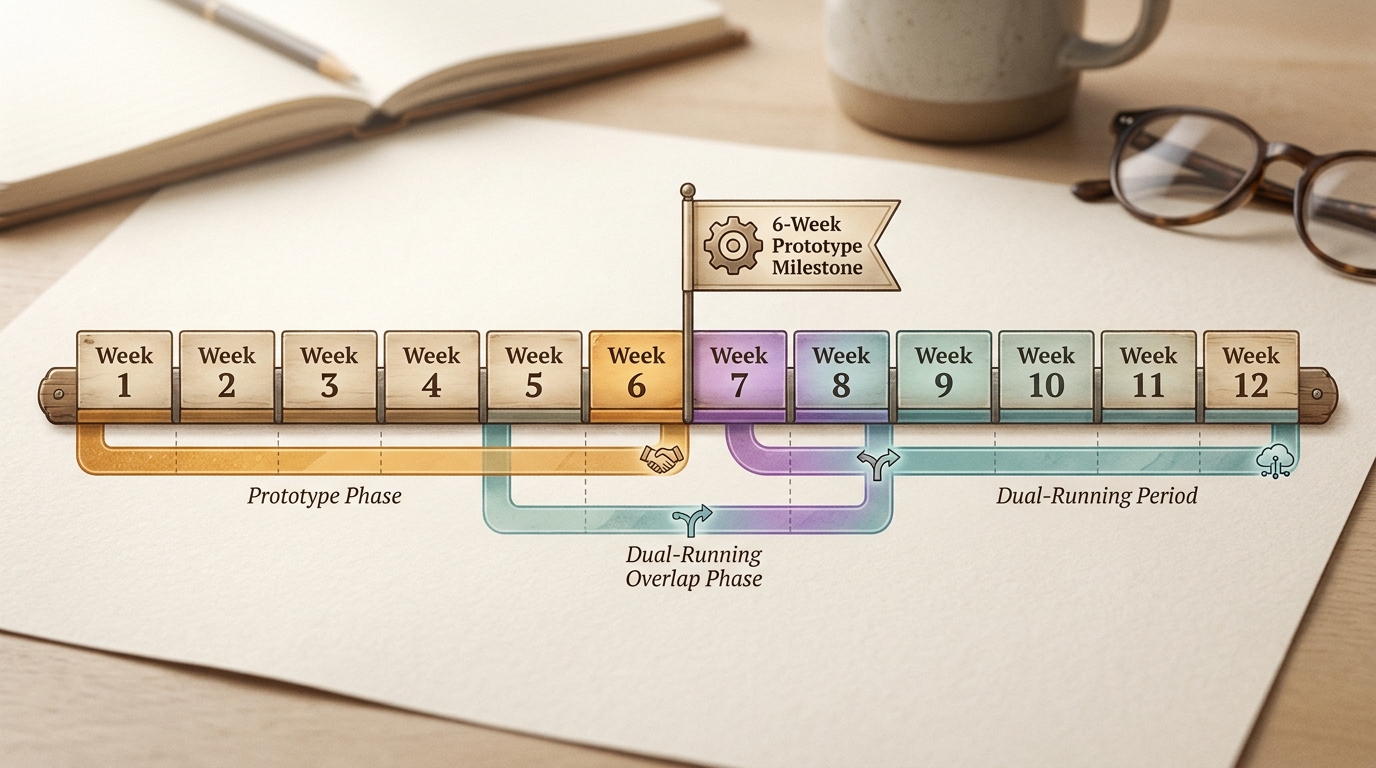
Phase 3: The six-week working prototype. Put real production data on real devices over the real Wi-Fi before anyone polishes a single screen. Test data does not surface edge cases. You need to see what happens when an operator submits a batch ticket from a tablet in the dead zone behind the packing line.
Phase 4: Dual-running and controlled pilot. Run both systems together, and treat this as the most dangerous phase of the project. If staff key live numbers into both, the two records will diverge within days. One system must be the declared authority at each stage, and a named manager decides which. In week seven the web app might produce the daily reports while the workbook remains the official ledger for accounting. By week nine, the web app is the only authority.
Phase 5: The export safety valve. Keep a solid export to CSV and Excel. People trust a new system far faster when they can pull their own numbers out of it whenever they want. The fear is not change. The fear is being locked out of data they have relied on for years.
Build, Buy, or Low-Code
Three realistic paths, each with a genuine case for it.
Off-the-shelf ERP. Strong for standardised accounting and supply chain. The trade is that you change your process to match the software rather than the other way round, implementation is expensive, and per-seat licensing charges you more every time you hire.
Low-code platforms. Tools like Retool and Noloco are genuinely good for fast internal admin dashboards and prototypes, and a capable internal team can ship something useful quickly. They get strained by offline shop-floor kiosks, heavy custom logic and high data volumes. If the factory connection drops, a cloud-dependent app stops.
Bespoke web application. Maximum control, shaped around the actual floor workflow, no per-seat penalty as headcount grows. You own the code and the data model. The cost is upfront development time.
| Approach | Best for | Main drawback |
|---|---|---|
| Off-the-shelf ERP | Standardised accounting and supply chain | Rigid workflows, per-seat licensing |
| Low-code | Fast internal admin tools and prototypes | Weak on offline kiosks, heavy logic, high volume |
| Bespoke web app | Core operations and shop floors | Requires upfront development time |
What It Actually Costs and How Long It Takes
Custom operational software is within reach for mid-market companies and industrial plants. The myth worth killing is that the only alternative to a broken workbook is a multi-million-dollar ERP programme.
A typical custom build at AWcode runs from $10,000 to $25,000 USD. Delivery takes 8 to 12 weeks, with a working prototype in week six. Hosting and ongoing support start at $400 per month. The stack is deliberately boring and proven: PHP with Laravel, MySQL or MariaDB, Redis, and AWS or Docker for infrastructure, with mobile where the floor needs it.
What pushes a project toward the top of that range? Hardware, mostly. Barcode scanners, RFID readers and direct PLC inputs all need specific engineering work. Multilingual kiosks, on-premise LAN deployment and real offline tolerance add time too.
Adoption: Why Good Systems Get Abandoned
Call it Excel Stockholm Syndrome. Operators will reject a web form that is slower than the keyboard shortcuts they have used for six years, and they are right to. Plenty of well-built systems die this way, impressive in the boardroom and useless at the line.
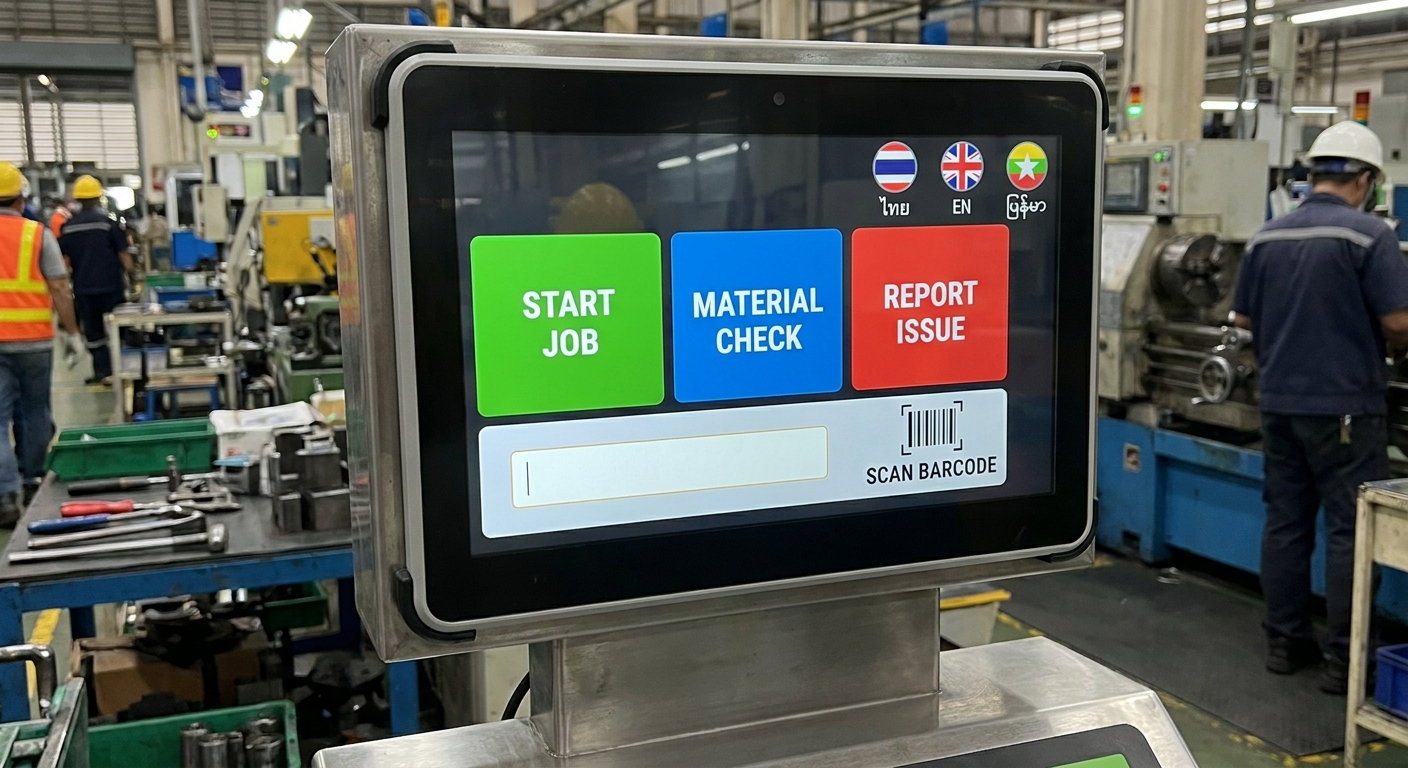
Entry speed decides adoption. If a worker has to peel off a glove to hit a small dropdown on a tablet, the clipboard comes back out. Large touch targets. Barcode scanning so nobody types a product code. Pre-filled defaults based on the current shift and machine, so the correct action is also the fastest one.
Language kills adoption just as quickly. A mixed-language floor needs a kiosk that toggles between Thai, English and Burmese instantly, without reloading or losing the operator's place in the workflow. The interface has to speak the language of whoever is standing in front of it. You cannot train your way out of a bad one.
Frequently Asked Questions
What happens to our old spreadsheet data? Active operational records get cleaned, mapped and imported into the new database. Older historical data is usually archived in a readable, searchable format rather than dragged into the live system.
Can we still export to Excel? Yes, and you should insist on it. A secure export to CSV or Excel means your team can still run ad-hoc analysis the way they always have.
Can the system work without internet on the floor? Yes. The application can be deployed on-premise over your local network, so production keeps running when the external connection drops.
What if our process changes next year? Because you own the software, the business logic, hardware integrations and workflows can be adjusted as operations change. That is the main advantage over licensed products with fixed processes.